 ThingzSafe
Web portal · Household / Pro
Bulk grid editing
Update several records together in a grid.
Where to start
Web portal: Sites and areas Site Area Bulk Edit Items
Open the grid
- Go to Sites and areas, then a Site and an Area.
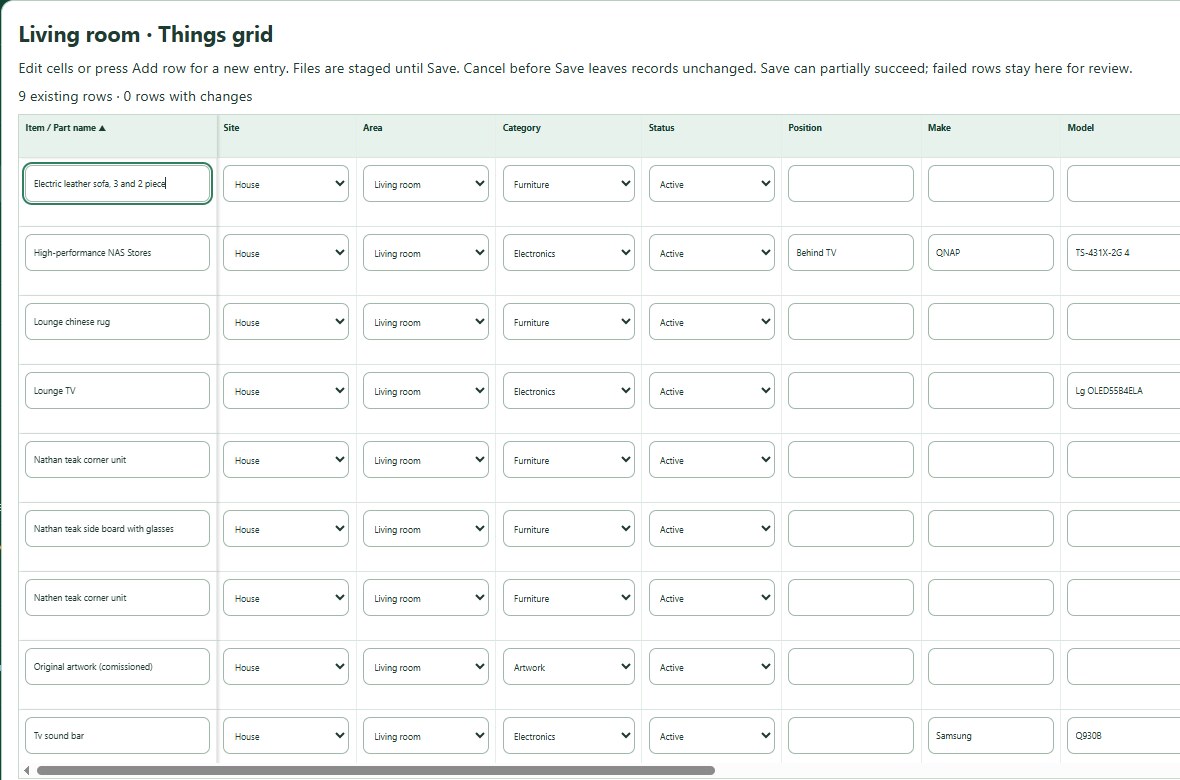
- Choose Bulk Edit Items. The grid shows the records you are editing.
- Check that you have the right Site, Area or Things.
- Click a cell to change it. Changed rows are marked.
- Check names, quantities, dates, values and locations before you save.
Good to know: Use the grid's file actions for the row you are on. Adding a file to one row does not add it to the others.
Save and check the results
- Choose the grid's save button and wait for the progress and results.
- Fix any rows marked with errors and save again.
Good to know: If your session ends, copy your unsaved work before you sign in again. A row that was rejected has not necessarily saved, so check its result. Avoid editing the same record on another device during a big batch.
Need more help or have a suggestion? Contact us.