 ThingzSafe
Android
Capture photos for later review
Save photos now and finish the item details later.
Where to start
Android: Home Menu Organise Capture photos for review
Take photos now, finish later
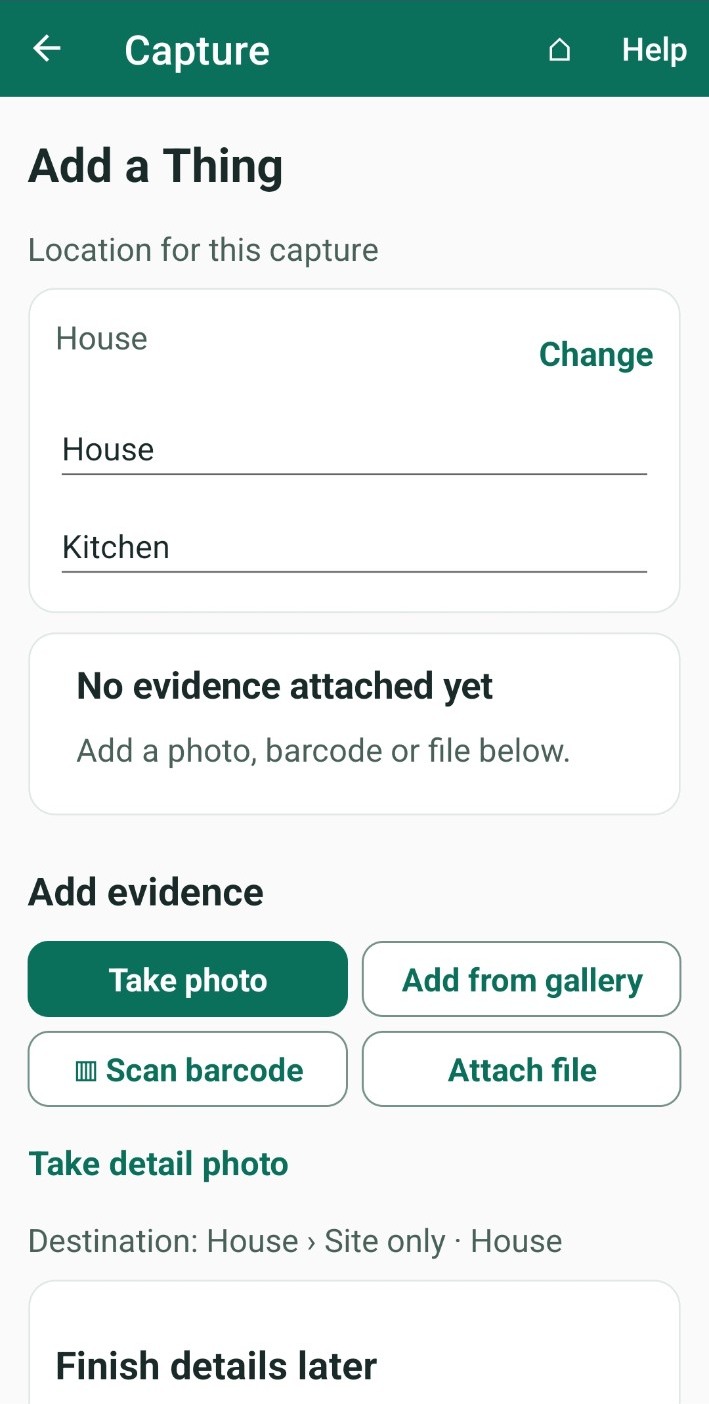
Use this when you want to photograph something quickly and add the details afterwards. Each capture is saved as a draft in your Review queue.
- Tap Change to choose the Site, and the Area if you use them.
- Tap Take photo to use the camera, then Use this photo. You can also tap Add from gallery or Attach file.
- Tap Take detail photo to add more photos of the same item, such as a label or damage.
- To mark which photo shows the item best, tap Main under it. To mark a photo of a label or barcode, tap Code.
- Tap ▥ Scan barcode if you want to scan a barcode as well.
- Save the capture:
- Save for review & add another: saves this capture and starts a new one.
- Save for review & finish: saves this capture and goes back to Home.
- Open review queue: opens the Review queue so you can complete it now.
What happens next: Your photos stay as drafts until you review them.
Good to know: Capturing one item at a time? Try Quick one-photo capture.
Need more help or have a suggestion? Contact us.