 ThingzSafe
Select the rows
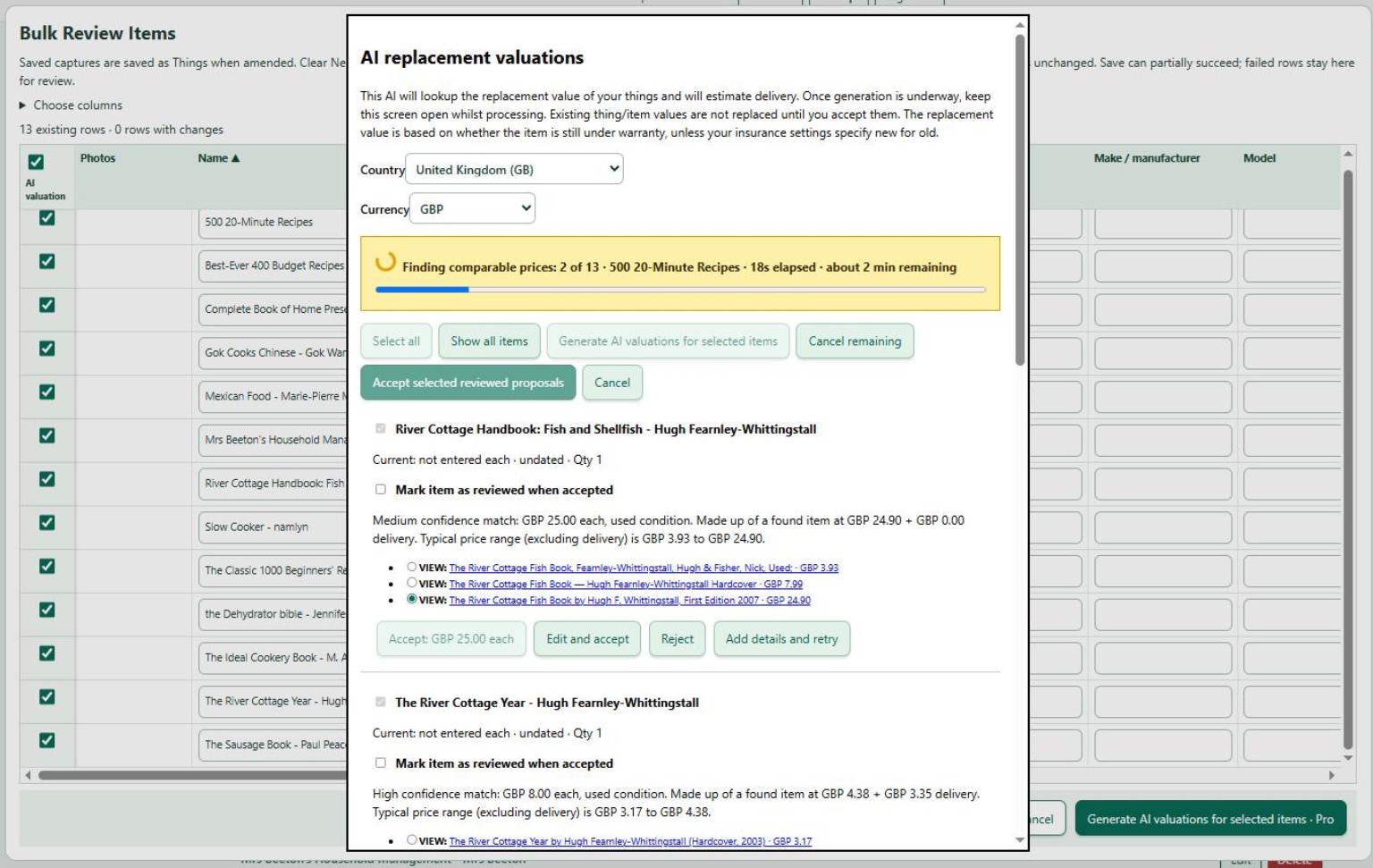
- Open Bulk Review Items and tick the AI valuation column for the rows you want. The header checkbox selects or clears all rows.
- Click Generate AI valuations for selected items · Pro. Save pending grid edits when asked, so renamed items use their updated details.
- Check the country and currency in the valuation window, then Generate. Keep the window open while it processes.
Review and apply
Select a low, middle or high comparable using its radio button, and open the VIEW link to check the listing. The proposed acceptance value updates with your choice. Edit and accept is available when you want a different reviewed amount.
Tick Mark item as reviewed when accepted if you want its Needs review flag cleared too. Accept individual proposals, or use Accept selected reviewed proposals to apply the selected results and close the window. Accepted values return to the current-value fields in the grid.
After generation, acceptance becomes the main action. A second accept action below the stack saves scrolling. Accepted item panels fold down.
Read the full guide to valuation basis, confidence, country, delivery and recovery.